免费MongoDB数据库 (cloud.mongodb.com )
在 cloud.mongodb.com 上注册的用户可以免费创建一个 MongoDB Atlas 免费版账户,该账户可以享有以下免费额度:
- 512 MB 存储空间。
- 免费的数据传输和数据接收。
- 3 个免费的数据集群(每个集群最多 3 个节点)。
- 免费的监控和警报功能。
- 免费的在线课程和 MongoDB 官方文档。
- 免费的访问和使用 MongoDB Charts。
- 免费的测试和开发功能。
需要注意的是,免费版账户的一些功能和限制可能会随时更改,具体的免费额度以 MongoDB Atlas 官网上的最新说明为准。如果你需要更多的存储空间、集群节点、数据传输或其他功能,可以选择升级到付费版的 MongoDB Atlas 订阅。
brew install mongodb-atlas
atlas --version
atlascli version: 1.5.1
git version: homebrew-release
Go version: go1.19.6
   os: darwin
   arch: amd64
   compiler: gc
命令行授权
atlas auth login
该命令将打开一个 Web 浏览器窗口,引导用户完成登录过程,并获取用于访问其 MongoDB Atlas 资源的访问令牌。
atlas setup
output
atlas setup
You are already authenticated with an account (xiongmingcai@gmail.com).

Run "atlas auth setup --profile <profile_name>" to create a new Atlas account on a new Atlas CLI profile.

[Default Settings]
Cluster Name:				cluster9999
Cloud Provider and Region:		AWS - US_EAST_1
Database User Username:			cluster9999
Load sample data:			Yes
Allow connections from (IP Address): 白名单默认IP
? Do you want to set up your first free database in Atlas with default settings (it's free forever)? Yes
We are deploying cluster9999...

Please store your database authentication access details in a secure location:
Database User Username: YouDbUser
Database User Password: YouDbPassword

Creating your cluster... [It's safe to 'Ctrl + C']
Cluster created.
Your connection string: mongodb+srv://cluster9999.tsafyhq.mongodb.net

Loading sample data into your cluster... [It's safe to 'Ctrl + C']

MongoDB Shell detected. Connecting to your Atlas cluster:
将你的IP地址添加到 MongoDB Atlas IP 地址白名单中
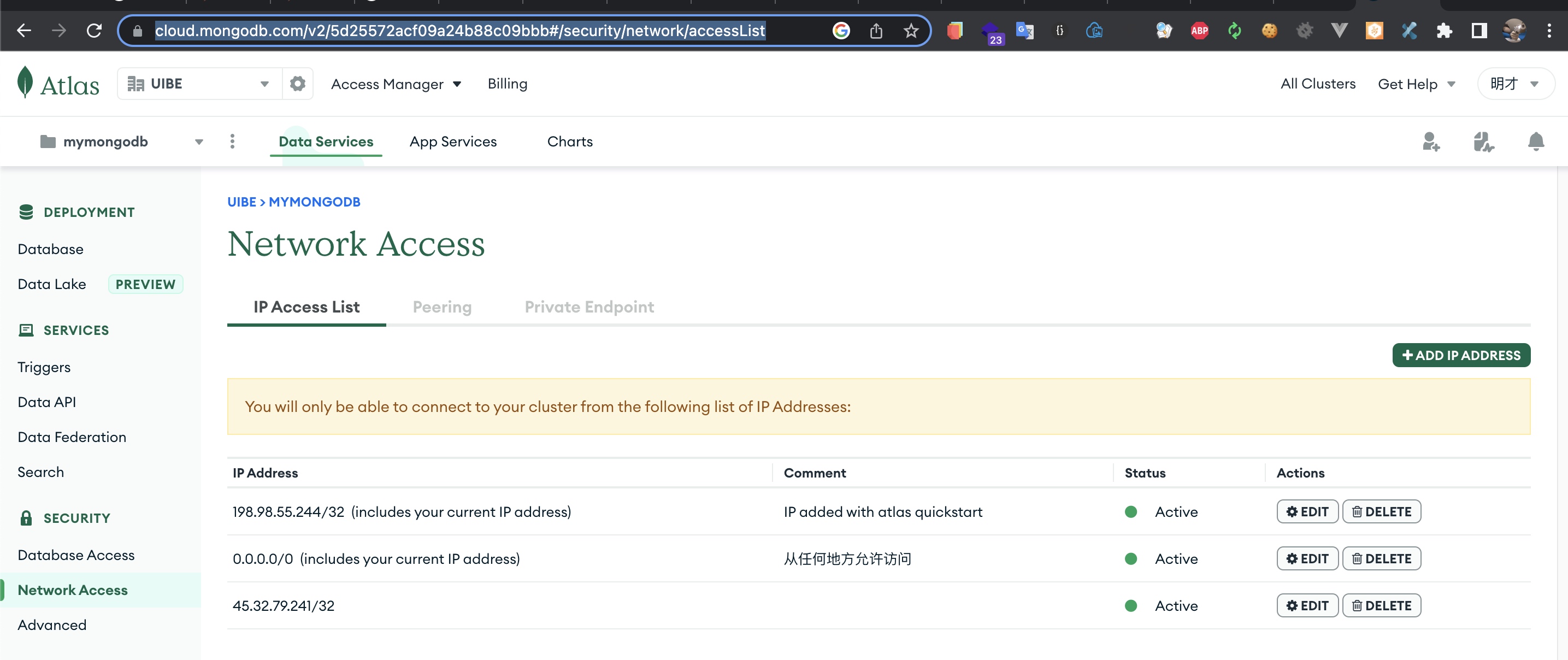
在 Atlas 管理界面中选择“Network Access”,然后单击“ADD IP ADDRESS”按钮,输入你的IP地址,然后单击“CONFIRM”按钮以保存更改。这样就可以将你的IP地址添加到 MongoDB Atlas IP 地址白名单中,以便你可以成功连接到 MongoDB Atlas 集群。
命令行登录
mongosh "mongodb+srv://cluster99999.tsafyhq.mongodb.net/test" \
 --username YouDbUser # -p YouDbPassword
然后输入密码 YouDbPassword 进行身份验证。
show databases
sample_airbnb        55.38 MiB
sample_analytics      9.17 MiB
sample_geospatial     1.37 MiB
sample_guides        40.00 KiB
sample_mflix         48.13 MiB
sample_restaurants    7.79 MiB
sample_supplies       1.11 MiB
sample_training      57.20 MiB
sample_weatherdata    2.97 MiB
admin               336.00 KiB
local                11.03 GiB
这些都是 MongoDB 官方提供的样例数据集,您可以在 Atlas 上免费使用这些数据集来练习和学习 MongoDB 的使用。
- sample_airbnb: 包含了 AirBnB 数据,您可以通过这个数据集进行数据建模和分析,以更好地理解 MongoDB 的特点和优势。
- sample_analytics: 包含了有关运营和管理方面的数据,例如收入、产品和客户数据等。这个数据集可以帮助您研究 MongoDB 的分析和聚合功能。
- sample_geospatial: 包含了有关地理空间数据的信息,例如地图和地标等。这个数据集可以帮助您了解 MongoDB 的地理空间查询功能。
- sample_guides: 包含了 MongoDB 的教程和指南,供您学习 MongoDB 的基础知识和最佳实践。
- sample_mflix: 包含了一个虚构的电影数据库,包括电影、演员和评论等信息。这个数据集可以帮助您练习 MongoDB 的 CRUD 操作和查询语句。
- sample_restaurants: 包含了一些餐厅的数据,例如菜单、评价和位置等。这个数据集可以帮助您研究 MongoDB 的文本搜索和地理空间功能。
- sample_supplies: 包含了有关供应链的数据,例如采购订单、供应商和发票等。这个数据集可以帮助您了解 MongoDB 的文档设计和嵌入式数据建模。
- sample_training: 包含了一些关于在线培训的数据,例如学生、课程和讲师等信息。这个数据集可以帮助您练习 MongoDB 的聚合管道和数据建模技巧。
- sample_weatherdata: 包含了有关天气的数据,例如气温、降水和风速等。这个数据集可以帮助您了解 MongoDB 的时间序列查询和聚合功能。
如何对这些库备份还原
mongodump --uri "mongodb+srv://<username>:<password>@cluster0.mongodb.net" --gzip --archive=<backup_file_name>.gz
具体来说,它使用了 mongodump 工具,该工具允许您将 MongoDB 数据库备份到一个压缩的存档文件中。这个命令指定了以下参数:
- --uri:指定要备份的 MongoDB 服务器的 URI,它指定了登录凭据和要备份的数据库。
- --gzip:指定要对备份数据进行 gzip 压缩,以减小备份文件的大小。
- --archive:指定要输出的备份文件名及其路径。
如果您只想备份特定的数据库,可以使用 -d 选项指定要备份的数据库名称。例如,备份 sample_mflix 库的命令示例
mongodump --uri "mongodb+srv://<username>:<password>@cluster0.mongodb.net" --gzip --archive=<backup_file_name>.gz -d sample_mflix
此命令将备份 sample_mflix 库并将其压缩到一个gzip存档文件中。
mongorestore --uri <connection_string> --gzip --archive=<backup_file>
其中,<connection_string>是您的 MongoDB 实例的连接字符串,<backup_file>是您之前使用mongodump备份数据集时指定的备份文件名。
在MongoDB 4.4及以前的版本中,mongodump、mongorestore等工具是作为MongoDB的一部分进行打包和分发的。从MongoDB 5.0版本开始,这些工具被移动到名为MongoDB Database Tools的单独软件包中,这个软件包可以从MongoDB官网下载并安装。因此,从MongoDB 5.0版本开始,要使用mongodump命令需要先安装MongoDB Database Tools软件包。